Meeting Recap
Updated October 11, 2026
On this page
The meeting recap feature in Demodesk ensures that every participant leaves the meeting with a clear record of what was discussed. Immediately after your meeting, Demodesk sends an email to all attendees containing the meeting's outline and a link to the recording. This not only provides a reliable reference but also keeps everyone on the same page regarding action items and decisions made. Say goodbye to the hassle of sending out repetitive follow-up emails. Our meeting recap works for you, freeing up your time for more critical tasks.
For meeting hosts, Demodesk offers an extra perk: a detailed summary included in your recap. This enhanced summary gives you a quick snapshot of the meeting’s key outcomes, making it easier to track progress and ensure follow-through on commitments. Stay organized and in control with Demodesk's comprehensive meeting recap, designed to streamline your workflow and boost your team's efficiency.
If a colleague recorded the meeting instead of you, their setting decides what you receive by email. The last section on this page covers that case.
How can I control who gets the meeting recap?
Go to settings > personal > preferences and select the option that fits your use case best:
- All participants: All participants invited to the scheduled meeting get the meeting recap.
- All internal participants: Only participants with the same email domain as you get the meeting recap.
- Only me: Only you get the meeting recap.
What is included in the meeting recap
The meeting recap includes the date and time of the meeting, its name, the meeting outline, and a link to the recording. The recording link is provided only if external access permissions are given.
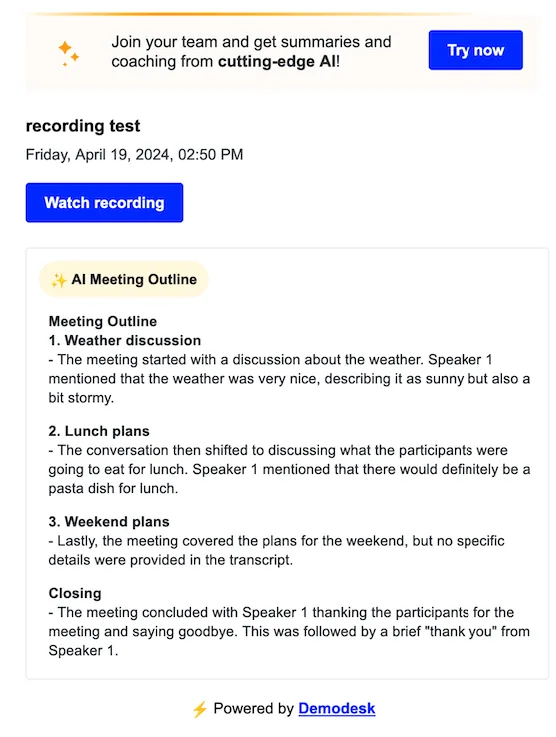
The meeting recap is even more comprehensive for meeting hosts, featuring a meeting summary and always including the recording link.
Will I get the summary if a colleague's notetaker recorded the meeting?
The recap follows the Meeting recap setting of the colleague whose notetaker recorded the meeting, not your own setting. What arrives in your inbox depends on the option they selected:
- All participants: Everyone else invited to the meeting gets the recap email with the meeting outline, and with the recording link when external access is allowed.
- All internal participants: Only people with the same email domain as that colleague get the recap email.
- Only me: Colleagues get nothing by email.
The detailed summary works differently. It only ever goes to the person who recorded the meeting, and only when their Meeting summary email notification is switched on under Settings > Personal > Notifications. So you never receive the full summary by email for a meeting a colleague recorded. When that colleague selected Only me, their own email contains the detailed summary but no meeting outline.
You can still read the summary in Demodesk, as long as the recording is shared with you:
- Click Recordings in the Demodesk navigation.
- Open the recording of that meeting.
- Open the AI Assistant tab. The meeting summary is shown there.
Dialer calls and uploaded recordings never send a recap to the other participants.
Related articles
More in this category
Still need a hand?
Our support team answers in the app chat, or at support@demodesk.com.